
How to Estimate Deployment Difficulty Before You Clone a Repo
A practical framework for predicting whether a GitHub project will be easy, moderate, or difficult to deploy.
Deployment difficulty is one of the most underestimated parts of open-source evaluation. You discover a repository, see an impressive demo, and assume that running it will be straightforward. Sometimes it is. Often it is not ?and the gap between "looks easy" and "actually works on my machine" is where most frustration lives.
Let me walk you through how to estimate that gap before you clone anything.
A project's deployment difficulty depends on more than the number of commands in the README. It depends on runtime versions, databases, background workers, GPU requirements, external APIs, authentication, file storage, queues, model downloads, environment variables, and the maturity of the docs. Two projects can both say "run Docker Compose" while having very different operational weight.
Git-Stars uses deployment difficulty as one of the three core axes in Viral Repos analysis because it answers a practical question: can the intended user actually make this project work? The same thinking appears in our Viral Repos reports and in the public Methodology behind Git-Stars.
Count the Moving Parts
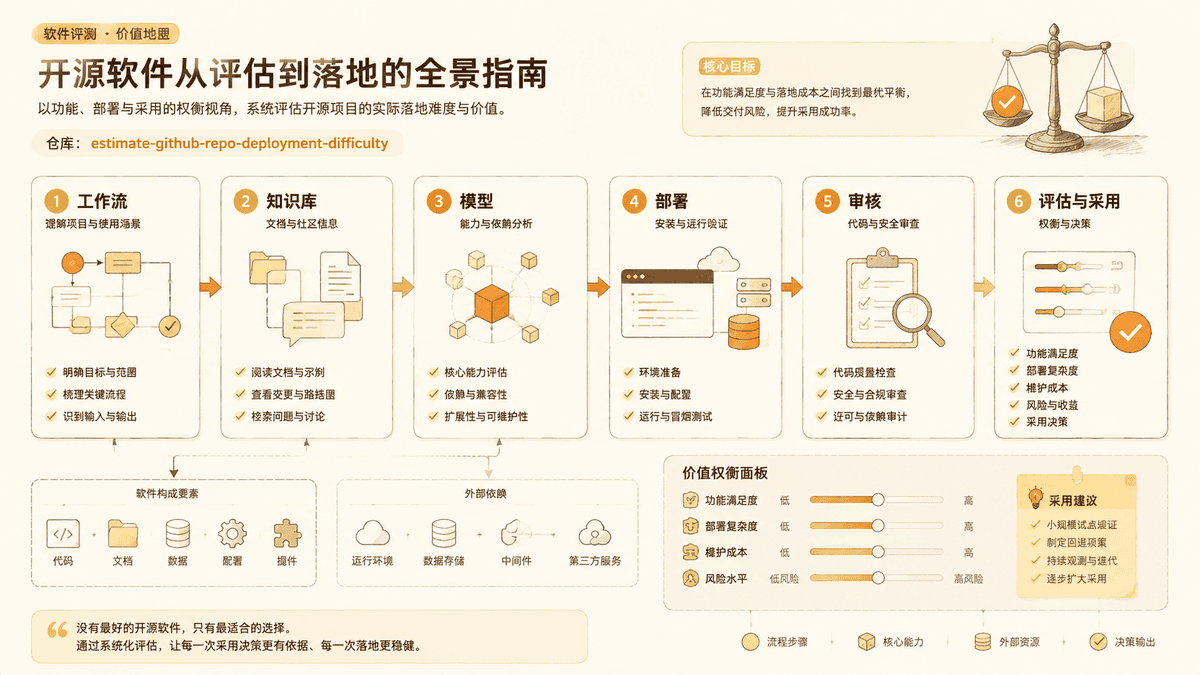
The fastest way to estimate difficulty is to count services. A single static site or command-line utility is usually easier than a full application stack. A project that needs a web server, database, Redis, object storage, worker process, model server, and third-party API keys is not impossible, but it is not beginner-friendly.
For example, PocketBase is relatively approachable because it packages a database, auth, and admin UI into a compact binary. Supabase self-hosted is more complex because it involves multiple services that recreate a hosted backend platform. Dify can be extremely useful for AI application workflows, but self-hosting it requires understanding services, databases, queues, model providers, and environment configuration.
The question is not whether a project is good. The question is whether its architecture matches your deployment skill level.
Read Environment Variables as a Complexity Signal
Environment variables reveal hidden dependencies. A short .env.example file
with clear defaults is a good sign. A long file with many required secrets,
provider-specific settings, callback URLs, storage configuration, and optional
feature flags means the project has more surface area.
Some complexity is legitimate. Authentication needs secrets. Payment systems need webhook keys. AI apps may need model provider keys. But each required variable is another place where setup can fail.
Before cloning, inspect whether the project documents:
- Which variables are required versus optional
- Where to get API keys
- Example values for local development
- Production differences
- Common misconfiguration errors
If the docs only say "copy .env.example and fill it in", the setup may be
easy for experienced developers but confusing for everyone else.
Check Whether Docker Is Maintained
Docker support can reduce setup difficulty, but only when it is maintained.
Look for recent changes to Dockerfile, docker-compose.yml, or deployment
docs. Check whether issues mention broken containers, missing migrations, or
outdated images.
A maintained Docker setup usually includes health checks, named services, persistent volumes, documented ports, and clear startup order. A weak Docker setup may work only on the maintainer's machine.
For non-coders, Docker is often the best first attempt. For production teams, Docker is only the beginning. You still need backups, updates, monitoring, secrets management, and security patches.
Identify Hardware Assumptions
AI, media, and data projects often hide hardware requirements behind friendly demos. A speech model may run on CPU but take too long for real use. An image workflow may require a modern GPU. A video processing tool may consume large amounts of disk and memory.
Projects such as ComfyUI, llama.cpp, and local voice generation tools can be excellent, but deployment expectations vary widely. A user with a consumer laptop will have a different experience from a user with a dedicated GPU workstation.
Before installing, check:
- Does the project require GPU acceleration?
- Are model files downloaded separately?
- How large are the models?
- Is CPU mode documented?
- Does the project mention memory requirements?
- Are cloud GPUs or hosted APIs alternatives?
If the README does not answer these questions, search the issues before assuming your machine can run it.
Look for Database and Migration Maturity
Any project with persistent data needs careful deployment. A database is not just a dependency; it is where user work lives. Deployment difficulty rises when the project includes migrations, background jobs, file uploads, or multiple storage backends.
Good signs include documented migration commands, backup guidance, seed data for local development, and clear upgrade steps. Risky signs include manual SQL steps, unclear schema changes, destructive reset instructions, or issues about failed upgrades.
If you are only experimenting, a rough database setup may be acceptable. If you plan to use the tool for real work, database maturity matters as much as the UI.
Real Projects Scored by Deployment Difficulty
| Project | Difficulty | Services | GPU Needed | Model Download | Typical Setup Time |
|---|---|---|---|---|---|
| PocketBase | Easy | 1 binary | No | No | 2 minutes |
| Ollama (single user) | Easy–Moderate | 1 service | Optional | Yes (2?0 GB) | 5 minutes |
| Open WebUI + Ollama | Moderate | 2 (Docker) | Optional | Yes | 15?0 minutes |
| n8n (self-hosted) | Moderate | 2? (app + DB) | No | No | 20 minutes |
| Supabase (self-hosted) | Difficult | 8+ services | No | No | 1? hours |
| Dify | Difficult | 5+ services | Optional | Optional | 30?0 minutes |
| ComfyUI + extensions | Difficult–Expert | 1 + models | Yes (8GB+ VRAM) | Yes (10?0 GB) | 1? hours |
| Meetily (full local) | Moderate | 2? | No (CPU Whisper) | Yes (~4 GB) | 20?0 minutes |
This table is a starting point ?actual experience varies by operating system, existing Docker familiarity, and hardware. For a deeper safety evaluation beyond deployment, see our adoption safety checklist.
Score Difficulty by User Type
Deployment difficulty is relative. A senior backend engineer and a non-coder do not experience the same README in the same way. Git-Stars separates difficulty from capability because powerful projects can still be poor fits for some users.
Use this simple scale:
Easy: one binary, one package install, or one hosted flow; minimal required configuration; works on ordinary hardware.
Moderate: requires Docker, several environment variables, a database, or basic command-line comfort; docs cover common errors.
Difficult: multiple services, GPU or model management, custom cloud setup, manual migrations, sparse docs, or unclear production guidance.
Expert: infrastructure-heavy, security-sensitive, requires domain knowledge, or has no reliable local setup path.
This score should be assigned for the intended user. A tool can be moderate for developers and difficult for non-coders.
Compare Alternatives Before Accepting Pain
Sometimes deployment difficulty is worth it. If a project gives you control, privacy, or capabilities no hosted service offers, setup effort may be justified. But difficulty should be a conscious trade-off.
Compare at least two alternatives:
- A lighter open-source option
- A more mature open-source platform
- A hosted product
- A direct API approach
For workflow automation, compare n8n, Windmill, and hosted automation tools. For local AI, compare Ollama, llama.cpp, and hosted model APIs. For backend platforms, compare PocketBase, Supabase, and traditional framework stacks.
The best choice is not always the easiest. It is the one whose setup cost makes sense for the value you receive.
A Pre-Clone Deployment Checklist
Before cloning a repository, answer these questions:
- How many services does it run?
- Does it require Docker?
- Does it require a database?
- Does it require GPU hardware or large model files?
- How many required environment variables exist?
- Are setup docs current?
- Do recent issues mention installation failures?
- Is there a production deployment guide?
- Can a hosted version solve the same need?
- Who will maintain it after installation?
If you cannot answer most of these, the project may still be worth exploring, but it should not be treated as easy.
Deployment difficulty is not a reason to avoid open source. It is a reason to choose with open eyes.
作者
分类
更多洞察

理解 GitHub Stars:它们意味着什么,又不意味着什么
基于数据分析 GitHub Star 实际衡量什么、作为质量信号的局限性,以及在做技术决策时如何解读 Star 数据。

Agent Skills: Why AI Coding Agents Need Reusable Working Memory
A practical review of addyosmani/agent-skills and why reusable skills are becoming an important layer for Codex, Claude Code, and AI coding workflows.

Headroom: Context Compression Is Becoming a Real Layer for AI Agents
A Git-Stars analysis of headroom, why token compression matters for coding agents and RAG systems, and where the project fits among MCP and LLM tools.
邮件列表
加入我们的社区
订阅邮件列表,及时获取最新消息和更新